> For the complete documentation index, see [llms.txt](https://hezhiqiang8909.gitbook.io/java/llms.txt). Markdown versions of documentation pages are available by appending `.md` to page URLs; this page is available as [Markdown](https://hezhiqiang8909.gitbook.io/java/docs/javatool/build/maven/maven-action.md).
# Maven 实战问题和最佳实践
* [1. 常见问题](https://hezhiqiang8909.gitbook.io/java/docs/javatool/build/maven/pages/-LyNWIpWvaeuZr9Vu9Z-#1-常见问题)
* [1.1. dependencies 和 dependencyManagement,plugins 和 pluginManagement 有什么区别?](https://hezhiqiang8909.gitbook.io/java/docs/javatool/build/maven/pages/-LyNWIpWvaeuZr9Vu9Z-#11-dependencies-和-dependencymanagementplugins-和-pluginmanagement-有什么区别)
* [1.2. IDEA 修改 JDK 版本后编译报错](https://hezhiqiang8909.gitbook.io/java/docs/javatool/build/maven/pages/-LyNWIpWvaeuZr9Vu9Z-#12-idea-修改-jdk-版本后编译报错)
* [1.3. 重复引入依赖](https://hezhiqiang8909.gitbook.io/java/docs/javatool/build/maven/pages/-LyNWIpWvaeuZr9Vu9Z-#13-重复引入依赖)
* [1.4. 如何打包一个可以直接运行的 Spring Boot jar 包](https://hezhiqiang8909.gitbook.io/java/docs/javatool/build/maven/pages/-LyNWIpWvaeuZr9Vu9Z-#14-如何打包一个可以直接运行的-spring-boot-jar-包)
* [1.5. 去哪儿找 maven dependency ?](https://hezhiqiang8909.gitbook.io/java/docs/javatool/build/maven/pages/-LyNWIpWvaeuZr9Vu9Z-#15-去哪儿找-maven-dependency-)
* [1.6. 如何指定编码?](https://hezhiqiang8909.gitbook.io/java/docs/javatool/build/maven/pages/-LyNWIpWvaeuZr9Vu9Z-#16-如何指定编码)
* [1.7. 如何指定 JDK 版本?](https://hezhiqiang8909.gitbook.io/java/docs/javatool/build/maven/pages/-LyNWIpWvaeuZr9Vu9Z-#17-如何指定-jdk-版本)
* [1.8. 如何避免将 dependency 打包到构件中?](https://hezhiqiang8909.gitbook.io/java/docs/javatool/build/maven/pages/-LyNWIpWvaeuZr9Vu9Z-#18-如何避免将-dependency-打包到构件中)
* [1.9. 如何跳过单元测试](https://hezhiqiang8909.gitbook.io/java/docs/javatool/build/maven/pages/-LyNWIpWvaeuZr9Vu9Z-#19-如何跳过单元测试)
* [1.10. IDEA 修改 JDK 版本后编译报错](https://hezhiqiang8909.gitbook.io/java/docs/javatool/build/maven/pages/-LyNWIpWvaeuZr9Vu9Z-#110-idea-修改-jdk-版本后编译报错)
* [1.11. 重复引入依赖](https://hezhiqiang8909.gitbook.io/java/docs/javatool/build/maven/pages/-LyNWIpWvaeuZr9Vu9Z-#111-重复引入依赖)
* [1.12. 如何引入本地 jar](https://hezhiqiang8909.gitbook.io/java/docs/javatool/build/maven/pages/-LyNWIpWvaeuZr9Vu9Z-#112-如何引入本地-jar)
* [1.13. 如何排除依赖](https://hezhiqiang8909.gitbook.io/java/docs/javatool/build/maven/pages/-LyNWIpWvaeuZr9Vu9Z-#113-如何排除依赖)
* [2. 最佳实践](https://hezhiqiang8909.gitbook.io/java/docs/javatool/build/maven/pages/-LyNWIpWvaeuZr9Vu9Z-#2-最佳实践)
* [2.1. 通过 bom 统一管理版本](https://hezhiqiang8909.gitbook.io/java/docs/javatool/build/maven/pages/-LyNWIpWvaeuZr9Vu9Z-#21-通过-bom-统一管理版本)
## 1. 常见问题
### 1.1. dependencies 和 dependencyManagement,plugins 和 pluginManagement 有什么区别?
dependencyManagement 是表示依赖 jar 包的声明,即你在项目中的 dependencyManagement 下声明了依赖,maven 不会加载该依赖,dependencyManagement 声明可以被继承。
dependencyManagement 的一个使用案例是当有父子项目的时候,父项目中可以利用 dependencyManagement 声明子项目中需要用到的依赖 jar 包,之后,当某个或者某几个子项目需要加载该插件的时候,就可以在子项目中 dependencies 节点只配置 groupId 和 artifactId 就可以完成插件的引用。
dependencyManagement 主要是为了统一管理插件,确保所有子项目使用的插件版本保持一致,类似的还有 plugins 和 pluginManagement。
### 1.2. IDEA 修改 JDK 版本后编译报错
**错误现象**
修改 JDK 版本,指定 maven-compiler-plugin 的 source 和 target 为 1.8 。
然后,在 Intellij IDEA 中执行 maven 指令,报错:
```
[ERROR] Failed to execute goal org.apache.maven.plugins:maven-compiler-plugin:3.0:compile (default-compile) on project apollo-common: Fatal error compiling: 无效的目标版本: 1.8 -> [Help 1]
```
**错误原因**
maven 的 JDK 源与指定的 JDK 编译版本不符。
**排错手段**
* **查看 Project Settings**
Project SDK 是否正确
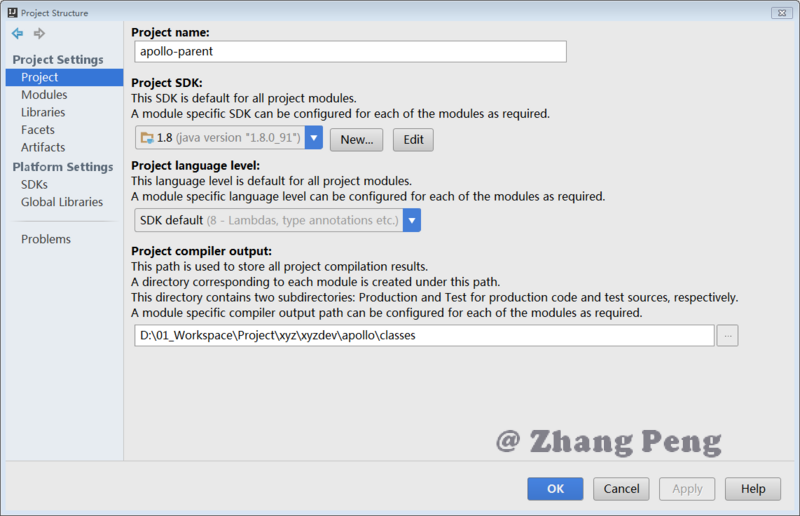
SDK 路径是否正确
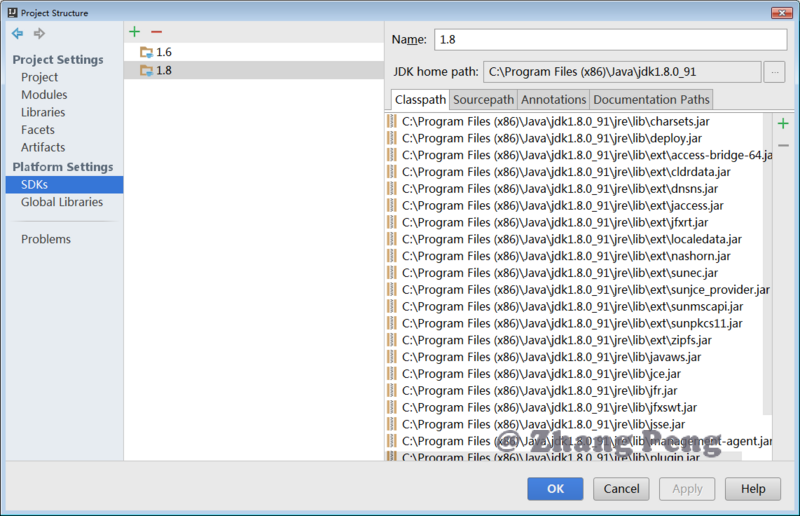
* **查看 Settings > Maven 的配置**
JDK for importer 是否正确
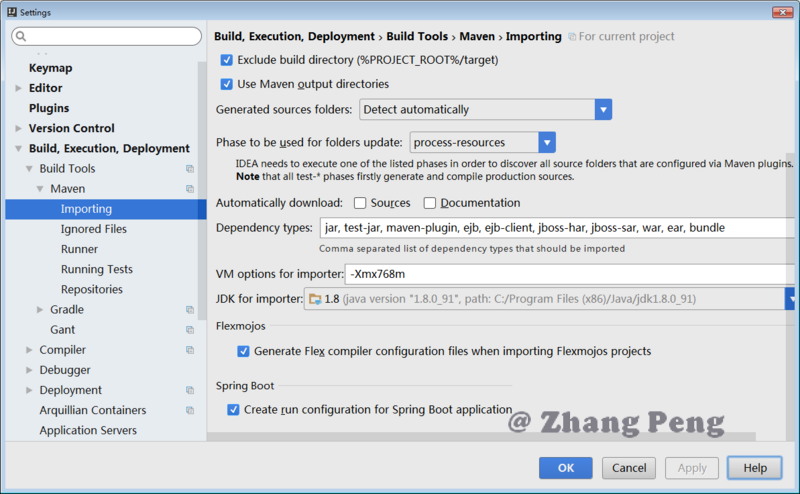
Runner 是否正确
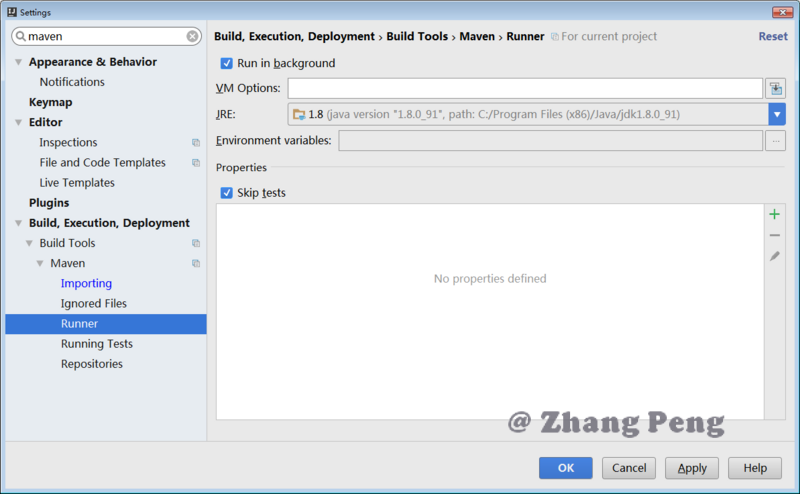
### 1.3. 重复引入依赖
在 Idea 中,选中 Module,使用 Ctrl+Alt+Shift+U,打开依赖图,检索是否存在重复引用的情况。如果存在重复引用,可以将多余的引用删除。
### 1.4. 如何打包一个可以直接运行的 Spring Boot jar 包
可以使用 spring-boot-maven-plugin 插件
```markup
org.springframework.boot
spring-boot-maven-plugin
repackage
```
如果引入了第三方 jar 包,如何打包?
首先,要添加依赖
```markup
io.github.dunwu
dunwu-common
1.0.0
system
${project.basedir}/src/main/resources/lib/dunwu-common-1.0.0.jar
```
接着,需要配置 spring-boot-maven-plugin 插件:
```markup
org.springframework.boot
spring-boot-maven-plugin
repackage
true
```
### 1.5. 去哪儿找 maven dependency ?
问:刚接触 maven 的新手,往往会有这样的疑问,我该去哪儿找 jar?
答:官方推荐的搜索 maven dependency 网址:
*
*
*
### 1.6. 如何指定编码?
问:众所周知,不同编码格式常常会产生意想不到的诡异问题,那么 maven 构建时如何指定 maven 构建时的编码?
答:在 properties 中指定 `project.build.sourceEncoding`
```markup
UTF-8
```
### 1.7. 如何指定 JDK 版本?
问:如何指定 maven 构建时的 JDK 版本?
答:有两种方法:
(1)properties 方式
```markup
...
1.7
1.7
...
```
(2)使用 maven-compiler-plugin 插件,并指定 source 和 target 版本
```markup
...
org.apache.maven.plugins
maven-compiler-plugin
3.3
1.7
1.7
...
```
### 1.8. 如何避免将 dependency 打包到构件中?
答:指定 maven dependency 的 scope 为 `provided`,这意味着:依赖关系将在运行时由其容器或 JDK 提供。 具有此范围的依赖关系不会传递,也不会捆绑在诸如 WAR 之类的包中,也不会包含在运行时类路径中。
### 1.9. 如何跳过单元测试
问:执行 mvn package 或 mvn install 时,会自动编译所有单元测试(src/test/java 目录下的代码),如何跳过这一步?
答:在执行命令的后面,添加命令行参数 `-Dmaven.test.skip=true` 或者 `-DskipTests=true`
### 1.10. IDEA 修改 JDK 版本后编译报错
**错误现象**
修改 JDK 版本,指定 maven-compiler-plugin 的 source 和 target 为 1.8 。
然后,在 Intellij IDEA 中执行 maven 指令,报错:
```
[ERROR] Failed to execute goal org.apache.maven.plugins:maven-compiler-plugin:3.0:compile (default-compile) on project apollo-common: Fatal error compiling: 无效的目标版本: 1.8 -> [Help 1]
```
**错误原因**
maven 的 JDK 源与指定的 JDK 编译版本不符。
**排错手段**
* **查看 Project Settings**
Project SDK 是否正确

SDK 路径是否正确

* **查看 Settings > Maven 的配置**
JDK for importer 是否正确

Runner 是否正确

### 1.11. 重复引入依赖
在 Idea 中,选中 Module,使用 Ctrl+Alt+Shift+U,打开依赖图,检索是否存在重复引用的情况。
### 1.12. 如何引入本地 jar
问:有时候,需要引入在中央仓库找不到的 jar,但又想通过 maven 进行管理,那么应该如何做到呢? 答:可以通过设置 dependency 的 scope 为 system 来引入本地 jar。 例:
* 将私有 jar 放置在 resouces/lib 下,然后以如下方式添加依赖:
* groupId 和 artifactId 可以按照 jar 包中的 package 设置,只要和其他 jar 不冲突即可。
```markup
xxx
xxx
1.0.0
system
${project.basedir}/src/main/resources/lib/xxx-6.0.0.jar
```
### 1.13. 如何排除依赖
问:如何排除依赖一个依赖关系?比方项目中使用的 libA 依赖某个库的 1.0 版。libB 以来某个库的 2.0 版,如今想统一使用 2.0 版,怎样去掉 1.0 版的依赖?
答:通过 exclusion 排除指定依赖即可。
例:
```markup
org.apache.zookeeper
zookeeper
3.4.12
true
org.slf4j
slf4j-log4j12
```
## 2. 最佳实践
### 2.1. 通过 bom 统一管理版本
采用类似 `spring-boot-dependencies` 的方式统一管理依赖版本。
spring-boot-dependencies 的 pom.xml 形式:
```markup
4.0.0
org.springframework.boot
spring-boot-dependencies
2.1.9.RELEASE
pom
```
其他项目引入 spring-boot-dependencies 来管理依赖版本的方式:
```markup
org.springframework.boot
spring-boot-dependencies
${spring-boot.version}
pom
import
```
---
# Agent Instructions
This documentation is published with GitBook. GitBook is the documentation platform designed so that both humans and AI agents can read, navigate, and reason over technical content effectively. Learn more at gitbook.com.
## Querying This Documentation
If you need additional information that is not directly available in this page, you can query the documentation dynamically by asking a question.
Perform an HTTP GET request on the current page URL with the `ask` query parameter, and the optional `goal` query parameter:
```
GET https://hezhiqiang8909.gitbook.io/java/docs/javatool/build/maven/maven-action.md?ask=&goal=
```
`ask` is the immediate question: it should be specific, self-contained, and written in natural language.
`goal` is optional and describes the broader end goal you are ultimately trying to accomplish on behalf of the user. GitBook uses it to tailor the answer towards what is most useful for that goal.
The response will contain a direct answer to the question and relevant excerpts and sources from the documentation.
Use this mechanism when the answer is not explicitly present in the current page, you need clarification or additional context, or you want to retrieve related documentation sections.